
RFQs, vendor quotes, and the resulting purchase order — all in Business Central.
bcrfq runs the whole quoting cycle inside Business Central — send an RFQ to your vendors, and the AI turns each reply (PDF, Excel, or plain email) into a Purchase Quote you can compare side by side. Processing a quote drops from about 20 minutes to 3–5. Review every line yourself, or let a background agent handle inbound replies for you.
Demo
See it in action.
The problem
Vendor quotes still arrive as PDFs and spreadsheets.
Procurement teams on Business Central typically get 15–25 vendor quotes a week — PDFs, Excel files, plain-text email. Each one gets opened, read, matched to items in BC, and lined up against the other quotes before anyone can raise a PO.
That work happens outside the ERP. It takes 15–30 minutes per quote, and the comparison usually ends up in a spreadsheet that no one else can see.
The solution
The whole RFQ cycle, on one Business Central document.
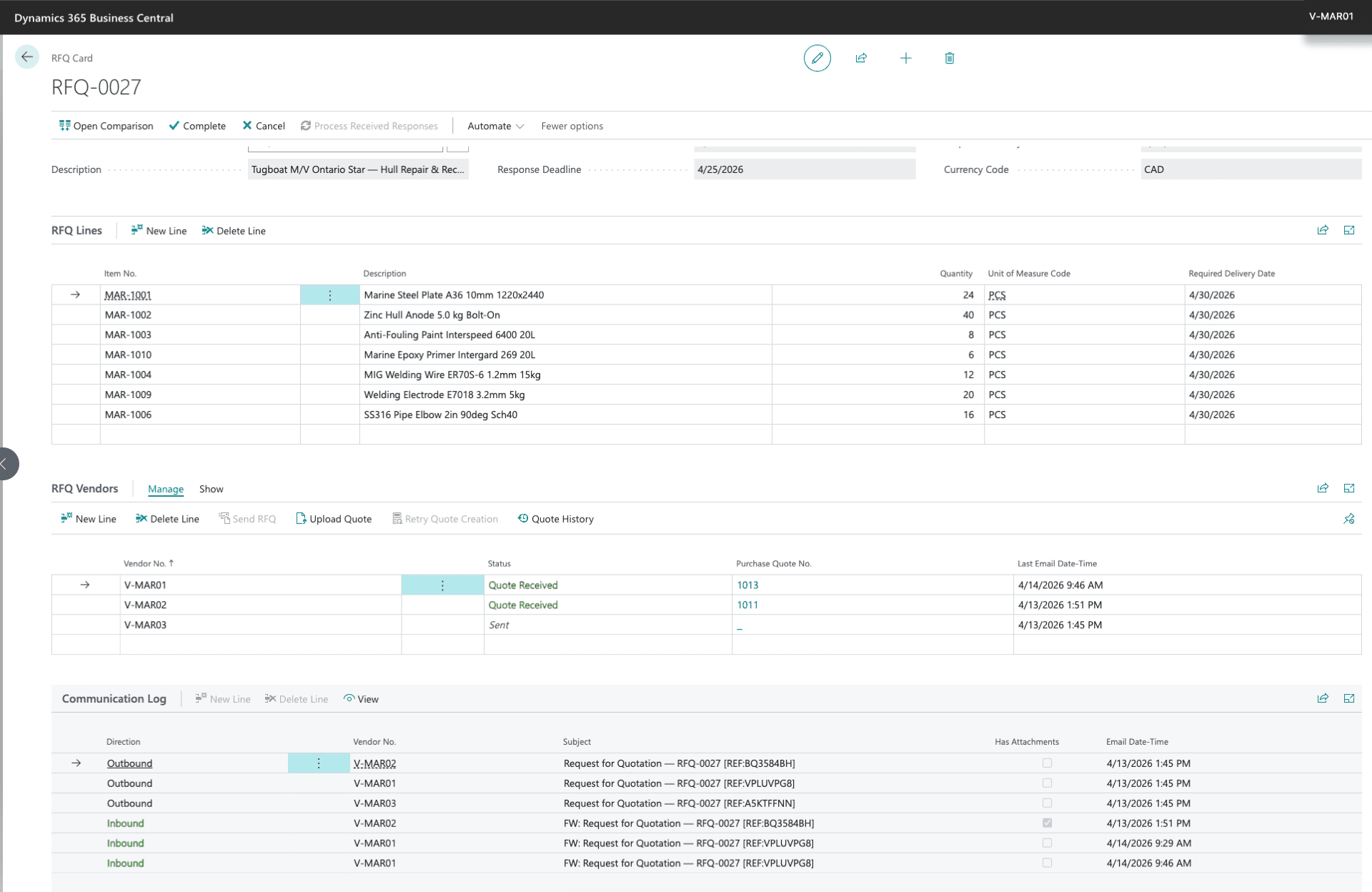
bcrfq adds a Request for Quotation document to Business Central. You select items, quantities, delivery dates, and the vendors to invite. The extension sends one email per vendor and tracks every response against the same RFQ.
AI reads every reply
The AI reads each reply — PDF, Excel, or plain-text email — and turns it into a standard Business Central Purchase Quote, matched line by line to your item catalogue. Review each extraction yourself, or let a background agent process inbound replies as they arrive.
Compare and convert
A side-by-side view shows every vendor’s price, MOQ, lead time, and validity. From the comparison, one action drafts the purchase order, updates Price List Lines, or updates the Item Vendor record. When a requested position isn’t in your catalogue yet, a Missing Item placeholder keeps it on the quote without creating a stray item record.
Also works from the sales side
A customer inquiry — entered by hand or forwarded to a monitored mailbox — becomes an inquiry document with the original email kept on the card, then converts into a Sales Quote whose lines you send out for quoting. Once vendor offers are in, the lowest and chosen vendor costs roll up onto the Sales Quote next to the price you give the customer.
Plugs into Projects
bcrfq plugs into the Business Central Project module too. Select Project Planning Lines on a project — Item, Resource, or G/L Account — and create an RFQ from them in a click. The winning quote becomes a Purchase Order linked to the project, so receipts post against Project Ledger Entries through standard BC.
It all runs on standard Business Central documents.
How it works
From request to purchase order in four steps.
- 1Start from an inquiry or a fresh RFQ
Pick items, quantities, delivery dates, and the vendors to invite from your existing Business Central vendor list — or begin with a customer inquiry that converts into a Sales Quote first.
- 2Send to vendors
One email per vendor, each tagged with a unique RFQ reference. Replies match back to the RFQ automatically.
- 3Capture and extract replies
Quotes return by email, file upload, or a monitored shared mailbox. AI extracts the lines into structured Purchase Quotes and matches each to your item catalogue — automatically via a background agent, or on demand for you to review.
- 4Compare and convert
Review the comparison and pick the lines you want. One action generates the purchase order — or updates Price List Lines or the Item Vendor record.
The flow
The whole cycle at a glance.
Three ways in, one way out. AI reads every email, file, and revision on both sides of the deal — you decide what moves forward, all inside Business Central.
Customer side
Vendor side
Benefits
What changes for the buyer.
Less manual data entry
Quote lines arrive as structured Purchase Quote rows, not as PDFs to retype — and a background agent can do the extraction for you.
Comparable offers, every time
All offers for an RFQ sit on one screen, normalised to your local currency, with the chosen vendor cost rolled up next to the price you quote the customer.
Item matching that improves with use
Each line is matched against cross-references, GTIN, and a learning table that remembers every correction you make.
Everything stays on standard BC documents
RFQs, Purchase Quotes, comparisons, and the resulting Purchase Orders all live on Business Central’s own documents.
Screenshots
Inside Business Central.
What’s new
Recently shipped.
Type in a vendor’s quote with their email open right beside it
No AI agent running, or out of monthly Copilot credit? Enter Quote Manually seeds a Purchase Quote straight from your RFQ’s lines, with the vendor’s email rendered right beside it so you read and type the prices in without switching windows. Works for replies that come back as a Word document too, not just PDF, Excel, or CSV.
Hardened against silent inbound mail loss
The vendor and customer mailbox monitors now poll with a rolling lookback window and remember every message they’ve already handled, so a mailbox backlog can no longer push new replies out of the fetch window, and a rejected email is never silently re-processed forever. Choose Dedicated or Shared mailbox mode in RFQ Setup, and use the new monitor health indicator and one-click Restart Monitoring if a monitor ever goes quiet.
Go straight from a customer inquiry to a vendor RFQ
Don’t wait to write the Sales Quote to start sourcing. Tick the lines worth pricing on a customer inquiry and send an RFQ to vendors right away — even before you know who the customer is. When you do write the Sales Quote later, the vendor prices you already gathered show up on it automatically.
Send an RFQ to every vendor in one click
Send to All Vendors dispatches the RFQ to every vendor who hasn’t been sent to yet in a single action — no more opening a separate email editor for each one — with a summary of who was sent, skipped, or failed.
Live activity tiles, confirmations, and richer lists
The role center now shows live counts for quotes awaiting review, expiring RFQs, failed agent tasks, and vendors still waiting on a reply — each one click from the filtered list. Cancelling an RFQ or creating purchase orders now asks for confirmation first, and the RFQ list shows vendor and response counts, linked Sales Quote, and status at a glance.
Customer inquiries become Sales Quotes
A customer request — typed in or forwarded to a monitored mailbox — now lands as an inquiry document, with the original email and any pictures kept on the card. Pick the lines worth quoting and convert it into a Sales Quote, ready to send out to vendors as an RFQ.
Who it’s for
Who gets value from bcrfq.
A good fit if you
- Run Microsoft Dynamics 365 Business Central as your ERP
- Are a manufacturer, wholesaler, or distributor with 30+ active vendors
- Process 10+ vendor quotes per month
- Compare offers from multiple vendors before raising a purchase order
Not a fit if you
- Run Dynamics NAV, GP, or another ERP
- Buy mostly on long-term contracts without per-order quoting
- Use a single vendor per item with no comparison step
Reviews
What early users say.
Smart and timely idea
Really smart, genuinely useful idea — putting AI-driven RFQ automation straight into Business Central hits a real procurement headache
Quite useful thing to extract vendor prices
Love the AI features that reads the inbox.
Works smooth
Great full flow app
This app has very unique feature that allows to inbound customer inquires from email using AI, then process them in BC and then create RFQ to vendors from that inbound and get prices on the sales quote. Quite helpful if you do lots of volume.
Trust
Built on standard Business Central, sold through AppSource.
- Distribution
- Listed on Microsoft AppSource. Installed and updated through the standard Business Central extension marketplace.
- Pricing
- €49 per user per month.
- Architecture
- Built on standard Business Central tables and pages — Purchase Quote, Purchase Order, Price List, Item Vendor, Item References. No parallel data model to maintain.
- Compatibility
- Requires Business Central 2026 release wave 1 (application 28.1.0.0) or later. The optional automation agent uses Business Central’s built-in agent capability.
- AI billing
- AI usage is metered through Microsoft Copilot Credits, billed by Microsoft as part of your Business Central subscription. No third-party billing, no AI keys to manage.
- Data privacy
- All AI processing runs on Business Central’s built-in Copilot capability, managed by Microsoft. Your quotes never leave Microsoft’s cloud and are never sent to third-party AI services.
- Publisher
- Published and supported by Integrated Technologies OÜ, a Microsoft partner based in Tallinn, Estonia.
- Support
- Replies come from the team that builds the product. support@integrated.ee.
Get started
See it on AppSource, or request a demo.
€49 per user per month. Demo requests: villem@integrated.ee